Plasma Mobile…
This is one of the coolest work I’ve seen in a while…..
yeah, that’s right…..
KDE ROCKS… \o/
Small things that make the difference – Google
this is one of the small things that makes you smile… =-)

that’s why Google is growing and evolving faster than ever…
Beauty contest: Nokia 5530 vs Nokia 5800
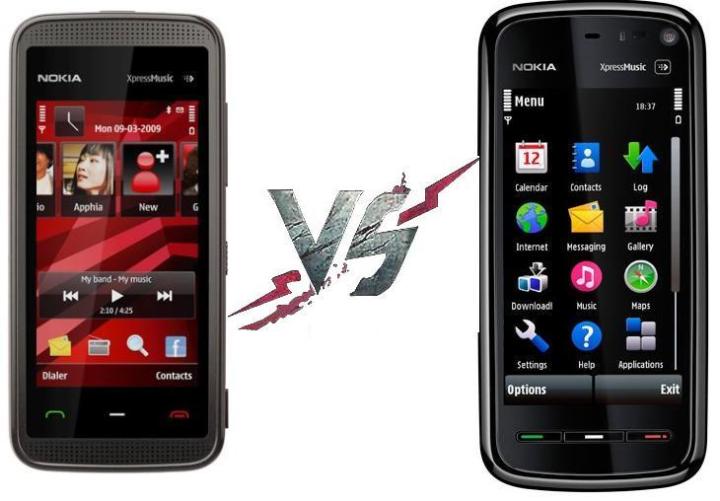
please vote the phone, which you think has better looks…
chromium browser for linux is a beta quality software now…
I just upgraded chromium browser on my machine to “Chromium 4.0.222.1 (Ubuntu build 28248)“…
and now it supports,
– google chrome themes
– flash without any command line arguments (–enable-plugins)
It’s now comparable to google chrome for windows… except google-talk of course…
so I’m expecting google to announce the chromium browser as a beta software [ forget alpha 😉 ] soon..
???
What are you waiting for….. fire up your package manager and try it out…


UPDATE:
Just found out, it still does not show new java based yahoo mail interface… so it cannot be called beta software yet….
nevertheless, we have now almost perfect flash support and stunning speed…
I think google will declare chromium as beta only after the implementation of some of these known problems and “google voice & video chat” support… 🙂
multiple target patterns. Stop.
If you are encountering this error while compiling your project using cygwin:
————————————————————————-
make -j3 all
src/SwcAbCd.d:1: *** multiple target patterns. Stop.
————————————————————————-
then check the version of make tool
make –version
(the command has two ‘-‘ not one as it appears here)
and if it’s 3.81, revert it back to 3.80,
I don’t know how and why, but this worked for me….. 😉
[ just for the record, I got this problem while I was compiling a project in Eclipse using cygwin gcc toolchain… ]
If you want to know more about this particular error, follow the link below –
http://theory.uwinnipeg.ca/localfiles/infofiles/make/make_121.html#SEC120
best video (media) player for the mobiles – CorePlayer
As I am going to buy Nokia 5530 (based on S60 v5)….
there is a problem, CorePlayer is not released for S60 v5 yet..
so, where would I play the mkv (H.264, vorbis) videos? (there is no alternative to this holy player)
for those who don’t know what CorePlayer is: CorePlayer is collection of best codecs available in the world and it plays almost all the formats you ask it,
it’s a little brother of VLC and MPlayer.
I am planning to compress my favourite movies to 200 MBs each in the above mentioned formats…. and keep in my upcoming phone…
so, I wish CorePlayer release their new version as soon as possible…. 😉
next time when you compress/rip a video…
take these into your consideration.. 🙂
There are three main components in – what we call a “video file” (“.avi”, “.mp4”, “.3gp”, “mpeg”, “.mkv” etc)….
– VIDEO (of course)
– AUDIO
– CONTAINER FORMAT
____________________________________________________________________
MY RECOMMENDATIONS:
Container format (or the extension of the file): MKV
Video compression format: H.264/AVC (using x264 encoder)
Audio compression format: ogg vorbis
software which will provide you all these options: Hand brake
____________________________________________________________________
what is “container format”?
well, generally the extensions of videos files are the “container formats”…
e.g. .avi, .mpeg, .mov, .mkv, .mp4..
these format keep one or more video, audio or subtitle files based on their capabilities, so these are like archived files…
The container format software knows how to extract (read) the video-audio-subtitle from the file and how to play them in synchronization…
Note: so when you rename an .mpeg file to .avi, its container format does not change… it’s still an mpeg file….
____________________________________________________________________
why mkv?
for number of reasons-
– it’s an open standard,
– future proof,
– its design allows to keep all video-audio-subtitle formats available in this universe…
– it requires lesser space than the other formats….
– can keep unlimited number of media files in it….
for more information read on wiki.
(i don’t understand, why people still use .avi?)
____________________________________________________________________
why H.264 (x264) video?
since H.264/AVC is best video compession hands down….(it beats Divx, xvid, real media, wmv, VP6-7)…
there is no comparision, believe me…..
it gives best quality videos on very less file size….
and to compress the video in H.264, there is this cool and fast encoder – x264 and it’s open source too.. 🙂
in case, you want to play the H.264 compressed video on your disk player… just check the specification of your player… since H.264 is not supported by all the disk players yet… (in that case you need to compress your video using xvid encoder)..
on the other hand, if you are going to watch on computer.. it’s all good… 😀
____________________________________________________________________
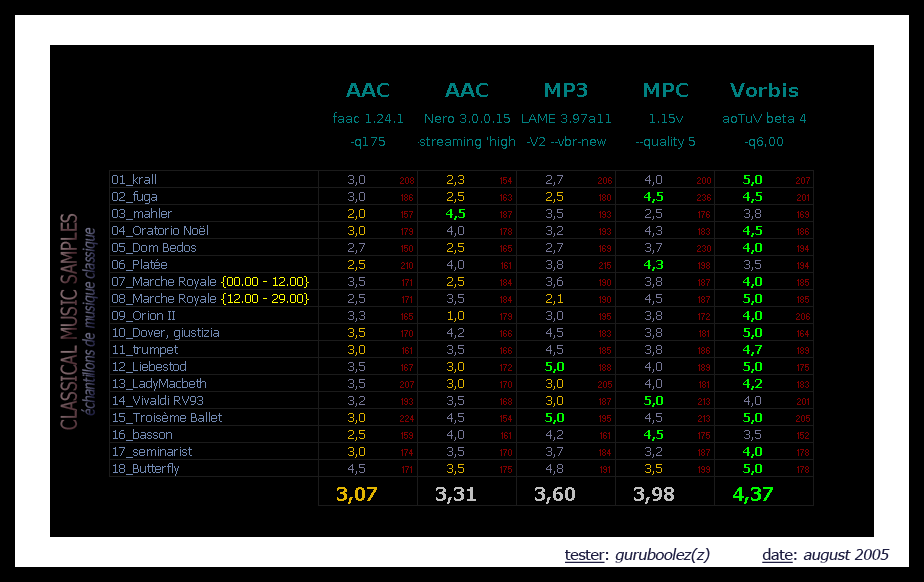
why ogg vorbis audio?
– it’s open source,
– best quality sound…specially for 128 kbps or less…
– again, less size for the great quality audio….
check the links out for performance comparision –
http://www.hydrogenaudio.org/forums/index.php?showtopic=36465
http://www.extremetech.com/article2/0,2845,1560783,00.asp
____________________________________________________________________
So, next time when you compress a HD video or RIP a DVD using “Hand brake” or some other converter….
go for these options..
– Container: MKV
– Video codec: H.264 (x264)
– Audio codec: ogg vorbis
____________________________________________________________________
COMPARISION OF DIFFERENT CONTAINER FORMATS
| Container formats | Subtitles | Video formats supported | Audio formats supported |
| 3GP | 3GPP Timed Text | H.263, MPEG-4 Part 2 andH.264/MPEG-4 AVC | AMR-NB, AMR-WB, AMR-WB+, AAC,HE-AAC and HE-AAC v2 |
| AVI | Yes, via third party modifications | Almost anything throughVFW; H.264/AVC is problematic due to the limited B-frame support | Almost anything through ACM; Vorbisis problematic |
| divx | Yes | MPEG-4 Part 2 video encoded to meet DivX profiles | MP3, PCM, AC-3 |
| FLV | No | Sorenson, VP6, Screen Video, H.264/MPEG-4 AVC | MP3, Nellymoser, ADPCM, Linear PCM,AAC, Speex |
| mkv | Yes | virtually anything | virtually anything |
| MP4 | ttxt, VobSubs with private objectTypeIndication not usable with the sceneDescription (started by Nero), BIFS | MPEG-4 ASP, H.264/MPEG-4 AVC, H.263, VC-1, Dirac, others | MPEG-1 Layers I, II, III (MP3), MPEG-2/4 (HE)-AAC, AC-3, Vorbis (with privat objectTypeIndication), Apple Lossless, others |
| mpg, mpeg | No | MPEG-1, MPEG-2 | MPEG-1 Layers I, II, III (mp3), other formats only in private streams:LPCM |
| MPEG-2 | Only in private streams – used inVOB files on DVDs | MPEG-1, MPEG-2, MPEG-4 Part 2 | MPEG-1 Layers I, II, III (mp3), other formats only in private streams:AC-3,LPCM, DTS |
| Ogg | Ogg Writ, Ogg Kate | Theora, almost anything through VFW | Vorbis, FLAC, Speex, almost anything through ACM |
| mov | Yes | Limited to what is available to the QuickTime codec manager | Limited to what is available to Sound Manager or CoreAudio |
| RMVB | Yes | RealVideo 8, 9, 10 | (HE)-AAC, Cook Codec, Vorbis,RealAudio Lossless |
small update on nokia 5530
just two days ago my friend has bought Nokia 5800 for Rs 13000/=,
that makes me say, nokia 5530 gotta be less than 12000…
nevertheless, there is 5800…. if something goes wrong and 5530 comes with a higher price tag I will go for it’s big brother…
but, i have to wait till diwali, since the prices here in mumbai (Maharashtra) are quite high…
arond 1500 rs higher than other states including Delhi…
so i’ll to wait till then.
I am really excited to get playing 640×360, H.264 AVC compressed movies on it… 😀
the nokia phone which I ever liked…
This is the phone which I fell in love with at first sight and the first phone from Nokia, i think i would love to buy …..
may be because, i heard the rumour that it’s going to be priced at around Rs 12000/=
and the design is superb….
i was waiting for openmoko GTA4 based phone to come, but now i think i can live with this beauty for a while….
let’s wait till nokia announce the price….
Nokia 5530 XpressMusic
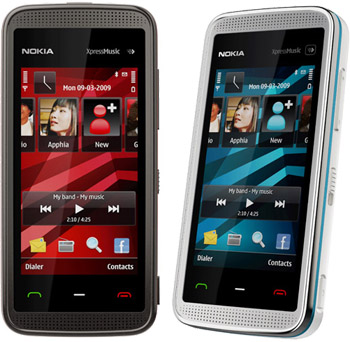
Announced Date: 15 June 2009
Device Description:
The Nokia 5530 XpressMusic is a S60 5th Edition device with a resistive touch screen and tactile feedback. The device has a 2,9“, bright nHD (640 x 360 pixels and 16:9 aspect ratio) AFFS display with homescreen featuring Contacts Bar and media bar. Input methods include full screen QWERTY, alphanumeric keypad and handwrite recognition. Other features include a 3.2 megapixel camera with flash, Bluetooth 2.0 +EDR, and USB 2.0 High-Speed.
want to convert/compress a video, try HandBrake….
Here is one beautiful software…. “HandBrake“…
it’s a “FREE and OPEN SOURCE” video conversion and compression software… and is available for following platforms:
windows – download link
ubuntu linux – download link for 32 bit, download link for 64 bit
mac os x – download link
source code – download link
now a days, whenever i look for any software…. my search string begins with “open source” instead of “freeware” or “shareware”… and i am gaining confidence…
i found this software quite handy and useful..
just now converted a 730 MB movie file into a 198 MB (i asked it to make 200 MB) mp4 (H264 based)….
it took around 20 minutes for 2 pass conversion, which is fine for me…. and the video quality better than what I was expecting.. 🙂
Supported sources:
Any DVD-like source: VIDEO_TS folder, DVD image or real DVD (unencrypted–protection methods including CSS are not supported internally and must be handled externally with third-party software and libraries), and some .VOB and .TS files
Most any multimedia file it can get libavformat to read and libavcodec to decode.
Outputs:
File format: MP4, MKV, AVI or OGM
Video: MPEG-4, H.264, or Theora (1 or 2 passes or constant quantizer/rate encoding)
Audio: AAC, MP3, Vorbis or AC-3 pass-through (supports encoding of several audio tracks)
Misc features:
Chapter selection
Basic subtitle support (burned into the picture)
Integrated bitrate calculator
Picture deinterlacing, cropping and scaling
Grayscale encoding
For more information go to their FAQ section.
here is screenshot for quick look…


 /home/Notoveryet
leave a comment